This article was copied from the Rekall Forensics blog, posted on 2014-03-28. Copied with permission for historical preservation.
Mac OS X 10.9 Memory Acquisition
Late in 2012, the only free solution for Mac memory acquisition was MacMemoryReader, which is not open source and depends on a binary distribution of the driver to be built especially for the target kernel. This means MacMemoryReader actually carries 5 different versions of it's kernel extension in it's supportfiles directory, and automatically chooses the correct one as long as it is used on a system that was supported at the time the program got packaged.
These constraints didn't fit our use case very well, which is why I developed an open source memory acquisition program for Mac OS X called OSXPmem. This program was designed specifically with the goal to be as operating system independent as possible, while providing a stable way to acquire memory even on future versions of Mac OS X.
With the 10.9 release of Mac OS X, MacMemoryReader stopped working (it only packages drivers for Mac OS X 10.5 - 10.8). Fortunately, OSXPmem still works and is currently the only free memory acquisition tool which is able to acquire memory on Mac OS X 10.9 or higher.
In this blogpost I want to elaborate a bit on the reasons for that, while also giving an overview on how memory acquisition on Mac OS X actually works under the hood.
How Memory Acquisition is Implemented
Because of memory protection it is not possible for a normal user-mode application to just go ahead and read all the memory. Each process resides in a virtual address space which is mapped into physical memory using paging. The data-structures used for this are managed by the kernel, and can only be accessed from system-mode. This is the reason why any memory acquisition program must first load a driver into the kernel, that provides the actual memory access.
Enumerating Physical Memory
Physical memory is not continuous, so don't expect the physical address space of a computer with e.g. 4GB of RAM to be laid out as one chunk from 00000000 - FFFFFFFF. The physical address space itself is again a virtual construct, controlled by the northbridge. For faster access to device memory, many hardware devices like graphics or network cards map parts of their integrated memory or registers into the physical address space via memory mapped I/O. The BIOS (or on modern systems the EFI) initializes the hardware on boot and arranges all these memory chunks into something called the physical address space. Here is a redacted example of the layout on my laptop:
 Size of physical address space: 6171918336 bytes (206 segments)
 Memory Type       Start Addr    End Addr
 Conventional  0000000000000000 000000000008f000
 Reserved      000000000008f000 0000000000090000
 Conventional  0000000000090000 00000000000a0000
 Reserved      00000000000a0000 0000000000100000
 ...
 Conventional  0000000100000000 000000016fe00000
Regions marked "Conventional" are guaranteed to be backed by physical memory, while regions marked "Reserved" might contain device memory. It should be avoided to read from the reserved regions, as this can trigger interrupts on a device and thus even result in a hardware malfunction, system instability and a kernel crash. If you're interested in more details I can recommend Gustavo Duarte's excellent articles Getting Physical With Memory and Motherboard Chipsets and the Memory Map.
The bottom line is that a memory acquisition tool must find out how physical memory is laid out in order to acquire it in a way that does not cause instability and thus loss of the desired data. This is usually done by querying the kernel, as it manages physical memory and has to know it's layout. On Mac OS X the EFI passes this information to the component of the kernel called the "platform expert" [Source Mac OS X Internals: A Systems Approach by Amit Singh], which stores it in a data-structure in PE_state.bootArgs->MemoryMap. If you look at line 13 of PE_state_raw.dtrace in MacMemoryReader's supportfiles directory, you can see how it is obtained:
self->kgm_boot_args = ((struct boot_args*)(`PE_state).bootArgs);
OSXPmem uses the same source of information to obtain the memory map. Unfortunately this information is not very reliable, as this data-structure is not used by the kernel at runtime, making it an easy target for rootkit manipulation. In one of our papers last year [published at DFRWS 2013] we showed that it is trivial to overwrite this data-structure, making memory acquisition impossible on the system. We also implemented a more reliable way to obtain an accurate memory map in that publication. However, this has not been implemented for Mac OS X yet.
Mapping Physical Memory
Because even the kernel operates inside virtual memory, the memory acquisition driver needs to map physical memory into the kernels address space. On Mac OS X, this is ultimately done by the Mach portion of the kernel. However, kernel extensions are not allowed to link directly to kernel functions. Instead, they are linked to Kernel Programming Interfaces (KPI), which are interfaces to a limited set of symbols Apple allows kernel extensions to use. The functions available through these interfaces can change with every kernel release, especially the ones in the "unsupported" KPI (where the Platform Experts state is linked from). But even supported KPIs like the ones for physical memory mapping can change, as Apple has shown in the past.
Both OSXPmem and MacMemoryReader use a simple BSD kernel extension (kext) to provide memory access. However, physical memory mapping is only supported from Apples IOKit framework. This is the reason why both kext use the IOMemoryDescriptor class to map memory into the kernel. Now with the introduction of memory compression in Mac OS X 10.9 this method has been found to cause problems. The kernel can compress and uncompress memory on the fly, and doesn't want any other driver touching it. It is entirely possible that in future Mac OS X releases some KPIs will change and this method of mapping memory will not be possible at all.
Luckily, we have also developed a different mapping technique. Originally intended as a rootkit resilient mapping technique, this approach has also proven to be very reliable on any major operating system. It works by directly modifying the page tables and clearing the caches, forcing the memory management unit (MMU) to remap an existing virtual address. As illustrated in Figure 1, a virtual page called "Rogue Page" is remapped by editing the page table entry (PTE) directly and then flushing the translation lookaside buffer (TLB). This enables us to access any arbitrary page in the physical address space, without any kernel dependency. Details on this approach can be found in our [DFRWS 2013] paper.
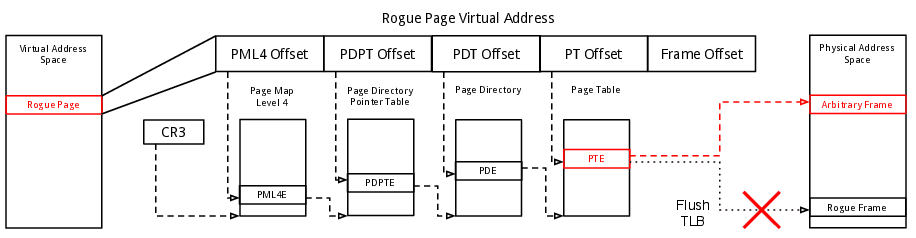
By "bypassing" the kernel when accessing memory this technique does not depend on any KPIs and thus isn't affected by compressed RAM or any obstacles Apple might decide to put into the IOMemoryDescriptor in future versions of Mac OS X. This is why we made it the default mapping method in WinPmem and OSXPmem. We expect this method to be more stable and resilient to changes in the kernel and even anti-forensic techniques.
Kernel Extention Code Signing
With the release of Mac OS X 10.9 Apple has changed it's previous policy on driver signature enforcement. While it was previously possible to sign a kernel extension, unsigned kext could also be loaded without any issues. In 10.9 and later, the kext loader displays a warning message when an unsigned kext is loaded. It is very likely that Apple will adopt the Microsoft approach at some time, preventing unsigned kext to be loaded.
32-bit Kernel Support
OSXPmem only supports Macs using the 64-bit version of Mac OS X. Apple introduced 64-bit builds with Mac OS X 10.6, making it the default with 10.7. Since Mac OS X 10.8, the 32-bit kernel is deprecated and all Macs running 10.8 or higher should be running in 64 bit mode. This means OSXPmem will not work on Mac OS X 10.5 or older, and might not work on some 10.6 systems. I will not add 32-bit support, as these kernels are deprecated and only run on very old machines anyways. If you need to acquire memory from such a system I encourage you to use MacMemoryReader.